Edições de design com IA em landings
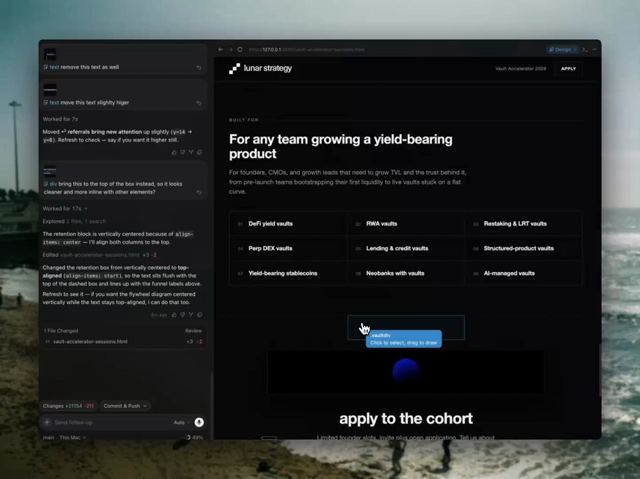
Shann Holmberg mostra como fazer edições rápidas de design em landing pages com IA no Cursor. Tutorial prático.
Texto do post
how to quickly do ai design edits on landing pages (and other designs) I started using cursor when they announced their IDE for vibe coding over 1.5 years ago, it was super exciting remember being locked in with @flowstated at our office in Lisbon just shipping as many different apps as we could back then cursor didn't have the design feature it has today, and I've completely gotten stuck on it now for the small stuff, it's so easy to have it on the side screen tweaking details instead of prompting the models in CMUX the video is me editing our latest landing page exactly like this, I keep an opus (GPT 5.6 and Fable for eval) session running in my CMUX terminal for the larger edits with full context, then jump into cursor's design mode to give the small detailed inputs directly, placements, spacing, the fine passes don't get me wrong, I love CMUX and juggling multiple terminal sessions at once, but for small to mid UI changes it's so much faster to prompt them in design mode where you can get more granular moral of the story, match the tool to the size of the edit, let the model do the big context-heavy changes in the terminal and go into a design feature for the small passes you want more hands-on
O que se vê
Uma landing escura permanece ao centro enquanto uma região é contornada, um campo contextual aparece junto ao alvo, a instrução é escrita e enviada e a coluna de conversa conserva o histórico ao lado durante estados de processamento e retorno à página.
Capa mostra conversa à esquerda e landing page Lunar Strategy à direita, com ferramenta de seleção sobre botão e seções de produtos DeFi.
Como funciona
Comentário ancorado no elemento
Leitura
Edição assistida fica mais auditável quando alvo, instrução e resultado conservam vínculos próprios e comparáveis.
Como aplicar
Registrar seletor/recorte do alvo, instrução, versão anterior e diff resultante, permitindo reverter sem depender da memória do chat.
- Criação
- Shann Holmberg
- Ferramentas citadas
- Cursor, CMUX, Opus, GPT 5.6, Fable
- Projetos e marcas
- Lunar Strategy
Não verificado. 1 arquivo(s), 2036 quadros em 21 pranchas sequenciais, com 35 controles em resolução integral, confirmados por todos os hashes SHA-256 canônicos. Sem amostragem temporal. Não houve reprodução audiovisual contínua. Não foram testados aplicação, precisão do alvo, fidelidade, velocidade, acessibilidade, versão ou conteúdo comercial da landing. Os arquivos não possuem faixa sonora segundo os metadados.
Abrir o post no X ↗Abrir no acervo
Referências parecidas
- User stories e job stories · @ParvSondhi
- Nove seções de uma landing page · @namyakhann
- Animar imagens do Grok com IA · @techhalla
- Histórias em pixel art com IA · @techhalla
- Curso de UI/UX no Figma de Gary Simon · @designcoursecom
- Protótipos com IA no lugar de entregas estáticas · @jayneil